
Import anything you already have
Word documents, PDFs, plain text, and Markdown. PDF import discards headers, footers, and page furniture so only prose survives.
Get a deep analysis of your work with the option to have the findings applied automatically
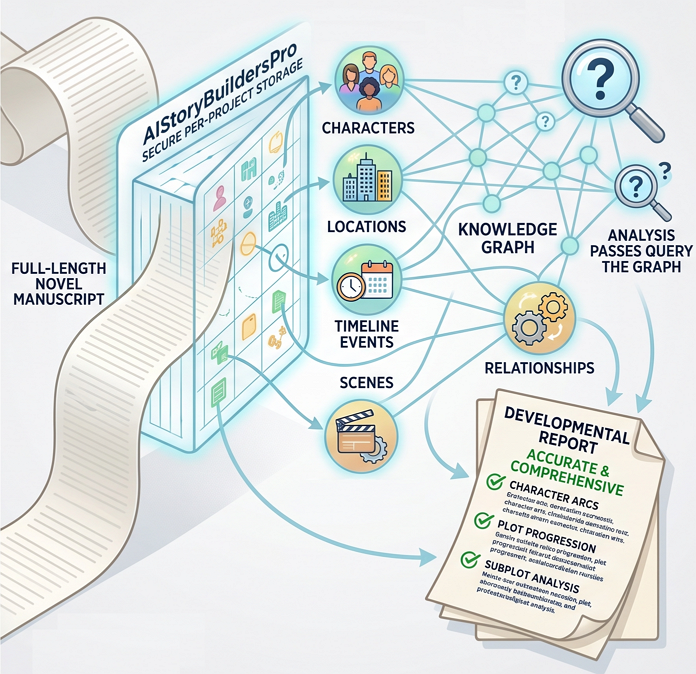
Even a one-million-token context window cannot hold a full-length novel and reason across every element in it. General-purpose coding and chat agents must compact, summarize, or drop earlier chapters to keep going — and once detail is compacted away the analysis inherits the gaps: characters drift, timelines contradict, subplots vanish, and the resulting report is confidently wrong.
AIStoryBuildersPro takes a different approach. Your manuscript is imported into secure, per-project storage and decomposed into a knowledge graph of characters, locations, timeline events, scenes, and relationships. Analysis passes query that graph instead of re-reading the whole book, so every detail stays addressable, nothing is compacted away, and the developmental report covers the entire work — not just the part that fit in the window.
This application produces developmental edit reports for fiction stories only.
Get a full developmental edit of your novel in about an hour. For novelists with a finished draft: upload your manuscript and AIStoryBuildersPro returns an editorial letter, a scored rubric, and continuity contradictions — each one pointing at the exact paragraph that caused it.
Get 10,000 free credits just for signing in. No credit card required.
Pay only for the credits you use. Your manuscript stays private to your account.
Drop in a .docx, .pdf, .txt, or .md file. It goes straight to private storage under your account.
We count words, detect chapters, and show you the maximum credit charge. Nothing runs until you approve it.
Your prose is split into indexed chapters and paragraphs so every later note can point at an exact span of text.
Characters, locations, beats, and timeline points become typed nodes, linked by the relationships your prose asserts.
Structured graph queries and a graph-grounded AI analysis produce the editorial letter, rubric, and continuity findings.
Work through the recommendations beside your manuscript, with the AI applying the edits you accept.
Send the revised story back through the pipeline, or export it as .stybld, Word, or PDF.
Word documents, PDFs, plain text, and Markdown. PDF import discards headers, footers, and page furniture so only prose survives.
Chapters and paragraphs get stable indexes inside a .stybld package, which is what lets every note anchor to an exact character range.
Typed nodes for characters, locations, beats, and timeline points, joined by typed edges. Aliases merge, so "Val" and "Ms. Reyes" are one person.
A named editor's letter, a story map, margin notes on the manuscript, and a versioned rubric score with a rationale for every item.
Attribute values are compared across chapters and the chronology is checked for gaps and cycles — no AI guesswork required.
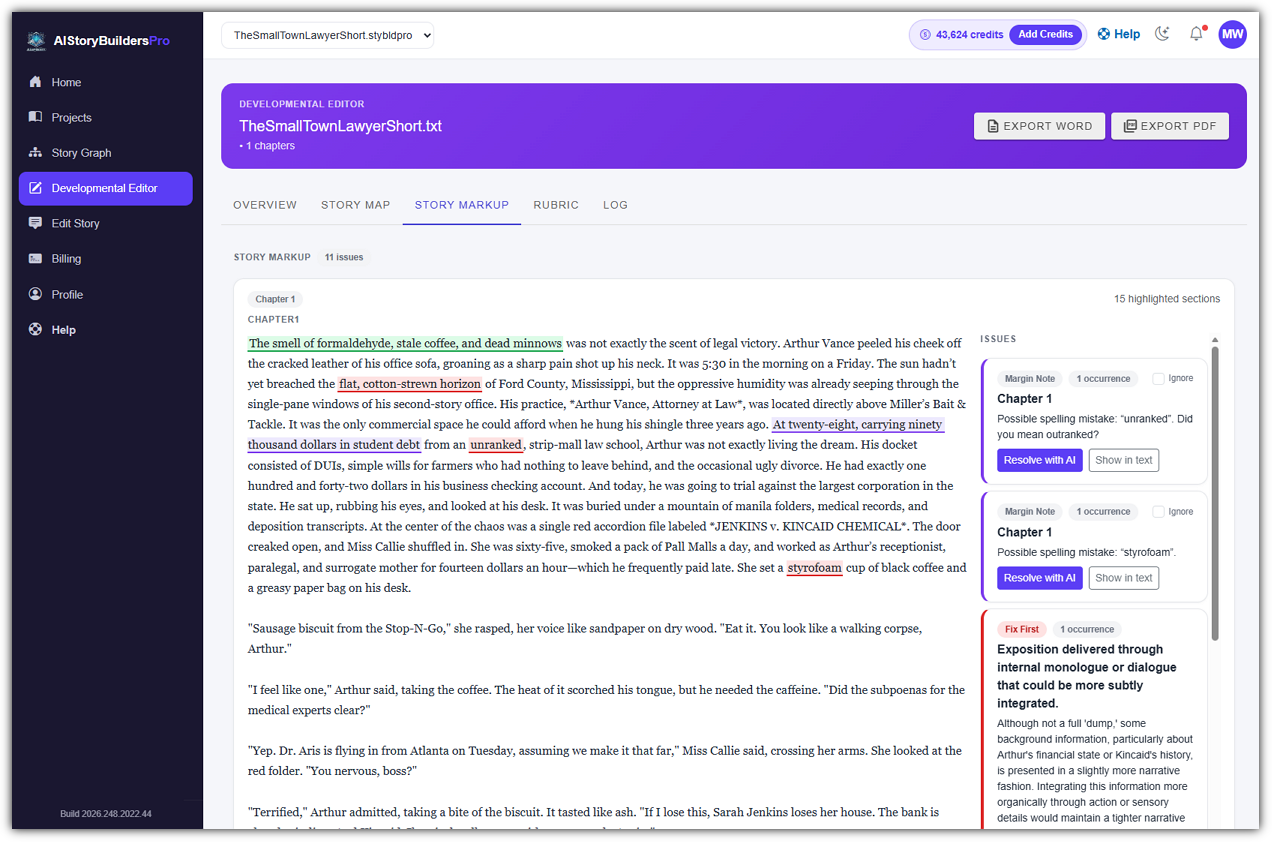
Open a recommendation, see the exact paragraph highlighted, and let the assistant apply the fix. Undo, redo, and export at any point.
A twelve-step conversion turns loose prose into indexed chapters and paragraphs
inside a .stybld package, then bundles the graph and report
alongside it as a .stybldpro project.
Characters, locations, beats, and timeline points become nodes. Every node and edge carries evidence: the chapter and paragraph where the claim was made.
Structured queries find orphan characters, broken chronology, and contradicting facts. A graph-grounded AI analysis writes the editorial letter on top of them.
Because paragraphs are indexed, a margin note carries exact character offsets. You click a recommendation and land on the sentence that caused it.
The Draft That Remembered Tomorrow — 3 chapters, overall score 61, and 8 continuity findings. Each one quotes the sentence that caused it.
Mara's red notebook becomes green without being replaced. Suggested fix: Revise the conflicting statements or explain the change in the narrative.
green notebook in her hand
Mara avoids coffee but later finishes the coffee she ordered. Suggested fix: Revise the conflicting statements or explain the change in the narrative.
Mara finished the coffee she had ordered
Theo says he has never visited the station but remembers its nonexistent cafe. Suggested fix: Revise the conflicting statements or explain the change in the narrative.
he remembered buying coffee from the little cafe beside platform three last winter
Every finished report can be published to a private web link. Anyone with the link reads the editorial letter, the story map, and the scored rubric in their browser — no account, no download, no software. Your manuscript itself is never on that page.
The recipient opens a normal web page on any device. There is nothing to download and no sign-up.
The link is opt-in, one report at a time. Revoke it whenever you like and the page goes dark immediately.
The shared page shows the Overview, Story Map, and Rubric. Your story markup, continuity detail, and processing log stay private to you.
The sample below is the same project every new account starts with — a real developmental edit, a real story map, and eight real continuity findings. No sign-up, no card, nothing to install.
Word (.docx), PDF, plain text (.txt), and Markdown (.md), up to 50 MB each. You can also re-open an existing .stybld or .stybldpro project.
You buy credits and spend them per job. Before any AI runs, you are shown the maximum credit charge for that job and must approve it. Unused credits from a reservation are returned.
We can offer refunds only for unused credits. Credits already used for AI token processing are non-refundable because of the high cost of those tokens.
No. Your manuscript is processed only to produce the analysis you asked for. To generate that analysis, excerpts are sent to a third-party AI provider under their terms — see the disclaimers.
Only you. Projects are private to your account. Sharing a report is an explicit action that creates a link you can revoke.
An editorial letter that opens with a Fix First list, a story map of cast, locations and timeline, margin notes anchored to exact paragraphs, a scored rubric with rationales, and the full processing log.
It builds a typed knowledge graph of your story first. That is what makes it possible to notice that a character's eye colour changed in chapter seven, or that a subplot never resolves.
Yes. The Edit Story page puts the recommendations beside your manuscript. You open a finding, see the exact paragraph highlighted, and the assistant applies the fix you accept. Undo and redo are always available.
Email Help@AIStoryBuilders.com and a human will answer.